Naming photo files consistently comes down to one pattern: date first in ISO format, then a short subject or project label, then a zero-padded sequence number. A name like 2026-09-04_harbour-walk_0042.jpg sorts by itself, tells you what it is without opening it, and never collides with the frame next to it. The trick is encoding that pattern once and letting your software stamp it on every file at import, rather than typing names by hand.
I used to rename photos in the evening, one by one, and abandoned it every time. Setting the rule up as a template takes about ten minutes and has saved me the same ten minutes on every shoot since.
You need very little. What matters is that you settle three decisions before renaming anything, and write them down somewhere you will find in six months.
One date format. Pick ISO 8601 (YYYY-MM-DD) and use it everywhere. Month-first formats quietly break chronological sorting in most file browsers.
A short label list. Decide the words you will reuse: your children’s names, your usual walks, your client surnames, your favourite spots. A fixed vocabulary is what makes a name searchable later.
A rename tool you already own. Every serious catalog application can batch rename at import. So can Finder and Windows Explorer, if you shoot RAW and edit elsewhere.
A backup, first. Copy the shoot somewhere else before you rename anything. Renaming is reversible in a catalog and mildly painful outside one.
Write your convention on a single page: the pattern, the separator character, the label vocabulary, and one worked example. That page is what you hand to an assistant or a retoucher so they do not invent their own scheme.
How to Name Photo Files Consistently
Consistency comes from the fact that every name has the same fields in the same order. Four fields is usually plenty: date, job or subject, sequence, and an optional variant tag. Anything beyond that stops being a file name and starts being a database record, which is what your catalog and its metadata are for.
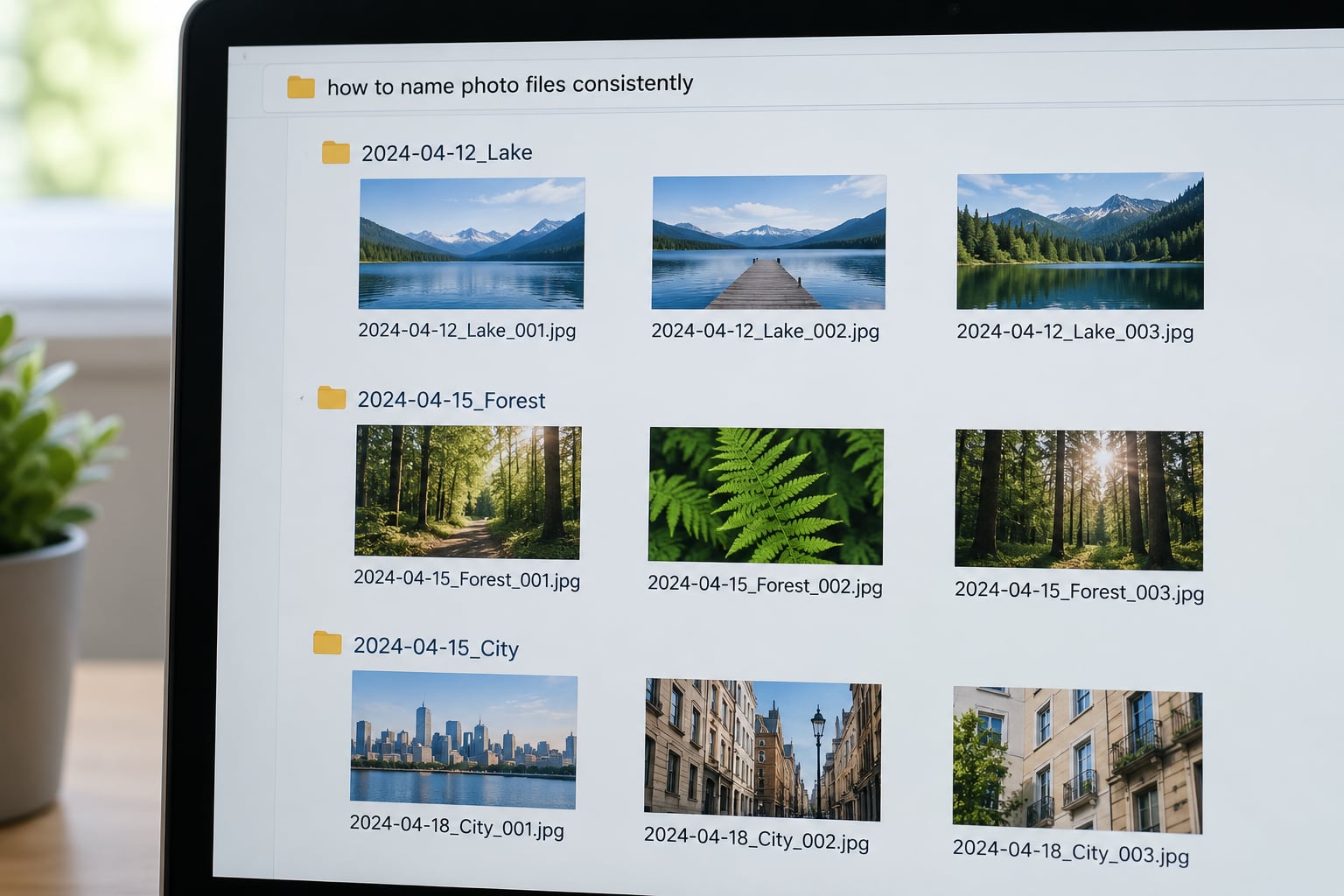
Here is the pattern most working photographers converge on:
date_subject_sequence_variant.ext
The fields earn their place in this order because each one answers a different question you will actually ask later. Date answers when, subject answers what and where, sequence answers which one, and the variant tag answers what changed in an edit or a retake.
Choose a Simple Filename Structure
One structure, used for everything, beats a clever one used for paid work and a lazy one used for weekends. The four-field pattern above scales from a folder of 12 snaps to a 400-frame wedding.
A personal library version: 2026-03-11_ivy-birthday_0031.jpg
A seasonal walk version: 2026-10-02_harbour-walk_0148.jpg
An organised shoot version: 2026-09-04_123-oak-st_kitchen_0012.jpg
Notice that the real estate name carries an address in the subject field and a room after the sequence. That keeps the frame number readable across every room in the house, which matters when the client asks for “the same angle in the kitchen but brighter”.
Use a Consistent Date Format
Use ISO 8601, written as YYYY-MM-DD. There is no ISO standard for the whole file name — ISO 8601 governs dates specifically — but this date format sorts alphabetically into chronological order because every field is fixed-width and the largest values come first.
Two rules make it hold up. Never write 04-09-2026: nobody can tell on sight whether that is 4 September or 9 April, and your file browser will not care. And never let the date format change halfway through a shoot.
Two cards from the same wedding are where people get caught. Both cameras start at 0001, and a single sequence counter per shoot will collide when the files merge. Either add the camera letter to the subject field (2026-06-20_wedding-hall-a_0001) or let the counter run across the whole merged batch and start it above the highest existing number.
Add a Clear Subject or Project Label
The subject field should be short, lowercase, and drawn from a list you decided in advance. One or two words is plenty. “Harbour walk” beats “Photos from the trip down by the water on Saturday with Sam’s camera”, and it is the version you will type when you search.
Hyphenate the words inside the label, so harbour-walk reads as one token. Keep the vocabulary fixed: if one folder says lounge and another says living room, half your future searches miss. Write the list down.
Per genre, the label tends to carry a different piece of information:
Type of photography
Subject label carries
Worked example
Wedding
Client surname and part of day
2026-06-20_alvarez-ceremony_0087
Real estate
Address and room
2026-09-04_123-oak-st_kitchen_0012
Portrait
Sitter and session type
2026-02-17_desai-headshots_0044
Wildlife and nature
Species and location
2026-01-22_kestrel-saltmarsh_0031
Family archive
Place or occasion
2026-12-25_mum-birthday_0203
On privacy: a client surname in a file name is fine on your own drive, but it will end up in a URL if you upload straight from that drive. Use an initials-only or job-number label for anything you publish to the web.
Add a Sequence Number or Suffix
The sequence number tells two identical shots apart, and it keeps files from two cameras or two cards unique. Zero-pad it to four digits — 0001 to 9999 — because unpadded numbers sort as 1, 10, 100, 2 in most browsers and editing applications.
Suffixes come after everything else, separated by the same separator you use between fields. Keep them to a fixed short vocabulary of your own: _edited, _crop, _bw, _hdr, _twilight, _v2. A tag like _final-final2-really is what a fixed vocabulary prevents.
One more worth knowing: appending _h or _v for horizontal and vertical lets you tilt a phone-held frame upright later without confusing which orientation you intended. Only do this if you shoot mixed orientation in one sequence.
Apply the System to a Batch of Photos
Never hand-type. The workflow is: copy to a backup, copy to your working drive, import into your catalog with a rename template, then spot-check three files.
In Lightroom and other catalog applications: set a rename template during import, using the capture date from EXIF data rather than the import date. Add a custom text field for the subject label, an auto-increment sequence number, and a file extension. Preview the result in the import dialog before you commit, because that is the only place you see the outcome before it happens.
In Capture One: the rename options sit on the import destination, with the same date-from-EXIF and custom text choices.
In Finder on macOS: select the files, right-click, choose Rename, then switch from the Name field to the batch fields (date, sequential number, custom text). The Match Original Style setting can reapply your pattern to all selected files.
In Windows Explorer: select the files, press F2, type a name, press Tab to move to the next file and the counter advances. Fine for a dozen files, tedious past fifty, so use your catalog for paid work.
On the command line: the exiftool utility can rename a whole folder in one pass using the same EXIF date and a sequence number, which is the fastest route when you are tidying an archive outside a catalog.
Same shoot, same frame numbers as the camera assigned them, now carrying the date, the job and the room. Sorting by name puts the living room before the kitchen; sorting by room groups them properly.
If you are tidying a library that already exists, work on a copy first and rename inside a catalog so the links follow. Keep the original camera name in the file’s metadata, and never rename a file you have already delivered — break that link and you will not reconnect the reprint to the right frame.
Common Mistakes
Almost every naming mess traces back to one of these, and each has a simple correction.
Vague labels.DSC_0042.jpg and IMG_1187.jpg tell you nothing, and they collide the moment two cards merge. Fix: label by date plus subject from your fixed list.
Mixed capitalisation.Harbour_Walk and harbour_walk are different search terms on Linux and on most web servers. Fix: all lowercase, always.
Spaces and punctuation. Spaces become %20 in URLs and break some upload forms; *, ?, #, % and ! break things more thoroughly. Fix: hyphens inside labels, underscores between fields, nothing exotic.
Month-first dates.09-04-2026 sorts alphabetically as September, and the shoot order quietly falls apart. Fix: YYYY-MM-DD, always four-digit year first.
Unpadded numbers._1, _2, _10 sort as 1, 10, 2. Fix: zero-pad to a fixed width.
Duplicate versions.final.jpg, final2.jpg, final (1).jpg pile up because the operating system made a copy instead of replacing. Fix: a version suffix from your fixed list, and confirm Replace in the copy dialog.
Renaming with no backup. Fix: copy first, always, and confirm two copies exist before you format the card.
A couple of habits worth keeping alongside this: keep folder nesting to two or three levels so paths do not run to 90 characters, and let your catalog’s keywords carry the detail your file name does not need. Names are for finding files on disk; keywords are for finding them inside the catalog.
Frequently Asked Questions
What is the best naming convention for photo files?
Use date first in ISO 8601 format, then a short subject or project label, then a zero-padded sequence number, with an optional variant tag last: date_subject_sequence.ext. A real example is 2026-09-04_harbour-walk_0042.jpg. Date-first means files sort chronologically without any further work, the label identifies the shoot without opening the file, and the sequence number keeps two cameras or two cards from colliding.
What are three things to avoid when naming photo files?
Avoid camera default names such as DSC_0042, which carry no information and collide when two cards merge. Avoid spaces and punctuation, because spaces break URLs and symbols such as question marks and percent signs break more than that. Avoid month-first dates and unpadded numbers, since both sort wrong without warning. Use lowercase, hyphens inside labels, and four-digit zero-padded sequences instead.
Should photo file names use spaces, hyphens or underscores?
Use hyphens inside a label and underscores between fields, with no spaces at all. So 2026-10-02_harbour-walk_0148.jpg rather than 2026-10-02 harbour walk 0148.jpg. Hyphens stay legible to people and are treated as word separators by search engines, while the underscore after the date stops the filename and extension merging into one run of characters.
How long should a photo file name be?
Aim for 30 to 60 characters including the extension. That is long enough to hold a date, a meaningful label and a sequence number, and short enough that file browsers, email clients and web servers display it without truncating it. If your names run past 80 characters, the label is usually carrying detail that belongs in metadata or keywords instead.
Do I still need to rename files if I use Lightroom or Capture One?
You get value either way. The catalog database handles search, so renaming is not essential for finding a frame while you are editing. Renaming still matters when files leave the catalog: exported JPEGs, zipped deliveries, MLS uploads and files opened on a phone with no catalog attached. Treat the catalog as your working index and the file name as your portable label.
How do I rename an existing photo library without breaking anything?
Copy the library to a new location first and keep the original untouched. Import the copy into your catalog, set a rename template using the capture date already stored in each file’s EXIF data, preview the result, then rename inside the catalog so existing links follow the files. Never rename a file you have already delivered, and keep the original camera name in the metadata so you can trace any file back.
Conclusion
If you do one thing, decide your date format tonight: YYYY-MM-DD, four digits first, no exceptions. Then write down the short list of labels you actually use, and set that pattern as a rename template in your catalog so it stamps itself on every file at import.
Start with one small batch you have already backed up somewhere else. Watch how the names sort, check that nothing collided when the files merged, and only then roll the system back through the rest of your archive.